The remix DAW for the Mac, built to get an idea into an arrangement fast. Tracks, remixes and sketches, built from loops, slices, pads, your own recordings and VST®3 instruments, without clicking your way through endless menus. MFKNE DAW takes care of tempo, key and the grid. The decisions stay yours.
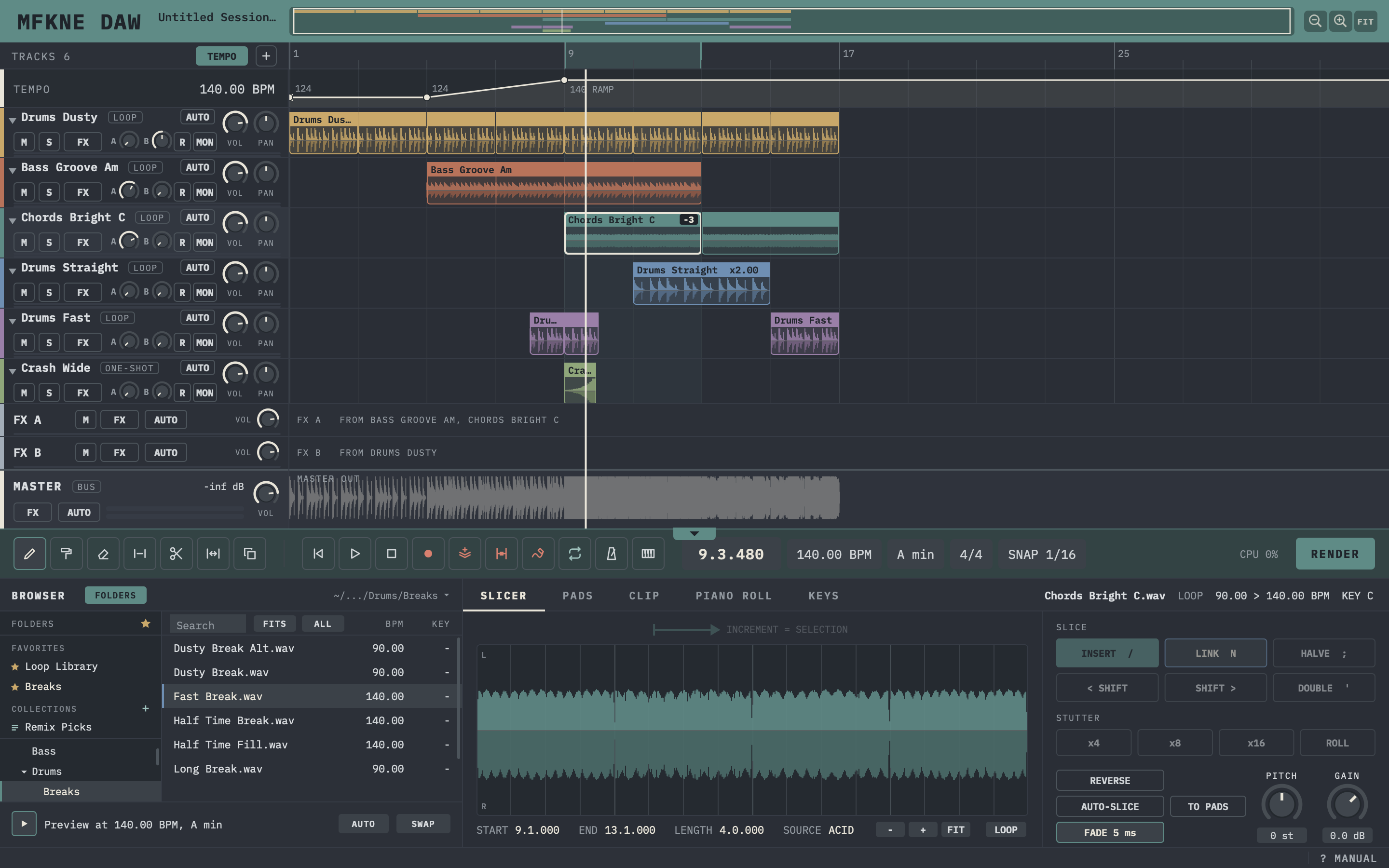
Tracks on the left, the arrangement in the middle, the master below with the waveform of the whole mix, an overview of the whole song in the title bar and, when you need it, the tempo lane under the ruler. Under it one bar with play, record and the tools, then the loop browser with your folders, favorites and collections, and the slicer, with the pads and the piano roll one tab away. The work happens in one place, and nothing pulls you away from the music.
The full window: overview, loop tracks, effect buses, master, toolbar, browser and slicer. Click the screenshot to enlarge it. Current beta build, details of the interface can still change before the release.
Why MFKNE DAW exists
Built because the Mac was missing it.
Two programs shaped the way I like to make music. ACID Pro, for its workflow: drag a loop in and it fits the tempo and key, paint it across the timeline, cut it apart in the chopper until it grooves. And energyXT, for its simplicity and its look: small, calm, nothing in the way.
ACID Pro runs on Windows only, and where it is heading is not clear to me. energyXT is no longer available. I work on a Mac, and I never found a DAW there that brings both together: the fast loop workflow and the simple, calm surface. So I started building one.
First of all for myself. Later, once it holds up, for everyone who wants to arrange on a Mac without wading through a feature list first.
No AI inside
Your ideas. Your ears. Your track.
MFKNE DAW does not write music for you, and it does not make the decisions. At this point it has no AI features, on purpose. Plenty of tools already offer them, and I believe something gets lost when the machine takes over the choices: the moment where you try something, listen, and keep it or throw it away.
MFKNE DAW wants to bring that moment back. It takes care of the technical side, so your time goes into the creative part. Which loop, which slice, where the break hits, when the drop comes: that is up to you.
The idea
Focus. Don't confuse. Let your ears decide.
The same idea that runs through every MFKNE plugin, applied to a whole workstation. MFKNE DAW is not meant to do everything. It is meant to get you from the first idea to a finished mix without detours.
01
Focus, not features
No drum generator, no sound library, no scene view, no AI. What is built in serves one path, from the first loop to the finished mix, and the seven mixing effects get by with five controls or fewer.
02
Overview, not clutter
One timeline with the whole song in view. Step back, see the arrangement, decide what comes next.
03
Ears, not menus
Loops fit the tempo the moment they land, and the key too when the file knows it. Fewer clicks, more listening.
Working in the beta
What you can do with it today.
Beta means the features planned for the first release are in, and now it gets tested and polished. This is what sets the current build apart, on my Mac today.
LOOPS
Drop it in, it fits
Every loop plays in project tempo, and in project key when it knows its own. If a file carries no tempo, MFKNE DAW detects it from the sound, and you can still correct it by hand. Your loop folders are analyzed once in the background, and the results are remembered.
STRETCH
Beats and tones, each done right
MFKNE DAW hears whether a loop is drums or tonal and stretches it accordingly. Drum loops keep the snap of every hit at any tempo, chords and bass keep their attacks and stay in tune when tempo or key change.
TIMELINE
Paint it across
Draw or paint loops across a track on the grid, cut, stretch and duplicate them. Reverse a clip, shift its pitch, fade it in and out. The waveform shows the left channel above the center line and the right one below.
SLICER
Take it apart
Pick a clip and the whole source opens below. Mark a slice and drop it anywhere, let it stutter or roll into a break, or let MFKNE DAW find the hits for you.
PADS
Play your slices
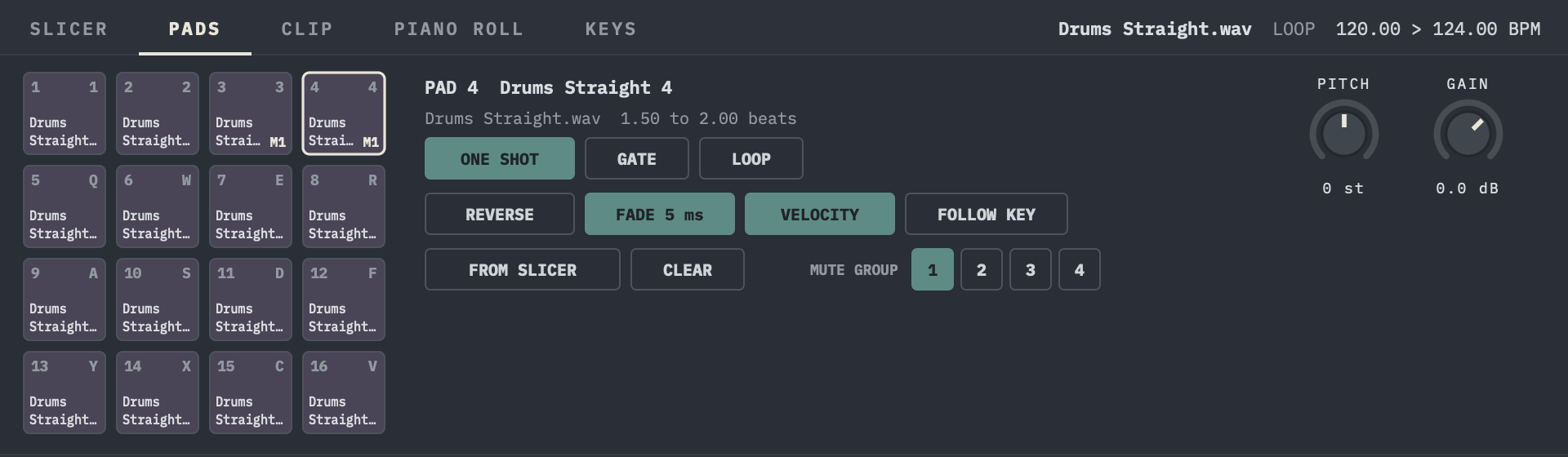
MFKNE Pads is built in: 16 pads on their own track. One click lays the slices of a loop across the pads. Play them from your MIDI keyboard or the computer keyboard and record what you play.
KEYS
One sample, every note
MFKNE Keys plays one sample across the keyboard. By default every note keeps the timing of the original and only the pitch changes. Switch to classic and it gets shorter going up and longer going down. Take the sample straight from the slicer or from a file.
BROWSER
Find it, hear it in time, swap it
Folders on the left, loops with tempo and key on the right, plus favorites and your own collections. Search the whole library, sort by tempo or key, or show only the loops that fit the tempo and key of your project. Preview a loop while the song plays, in time with it. Line loops up without the mouse, or swap one in the arrangement and it keeps its place and its effects.
MIDI FX
Phrases from a chord
MIDI effects sit before the instrument. MFKNE PHRASE turns held notes into phrases of up to 32 steps, with pitch, length, chance and two free parameters per step, a filter cutoff for example. MFKNE PITCH moves everything up or down. When it is right, render it to notes.
PLUG-INS
Eight MFKNE plugins on board
GLITCHRUIN, GOLDSMELT, GRAINWASH, PULSEMELT, PUNCHDUST, TAPEWRECK, TEXTURETAP and TONEBLEED come with MFKNE DAW, ready in the effects menu without installing anything. Install a newer version from the plugins page and MFKNE DAW uses that one.
Arrange: tempo changes within a project, as jumps or smooth ramps that loops, songs and recordings follow, whole songs that follow the project tempo beat by beat and the project key, even when the original drifts, with a beat grid you can correct by hand, folder tracks and an overview of the whole song.
Play and record: VST3 instruments with a piano roll and velocity editing, notes that snap to the project key as you play them in, MIDI overdub, recording on several armed tracks at once with input monitoring, punch-in and count-in.
Mix: seven built-in effects (EQ, compressor, delay, reverb, limiter, gate and filter), VST3 effects on tracks, folders and the master, effects on single clips, two effect buses, and automation of volume, pan, sends and plug-in parameters, drawn with curves or recorded while you play.
Finish: render and replace, stems, export as WAV, AIFF, MP3 or OGG, projects saved together with all their files, and an automatic backup.
MFKNE Pads: the slices of a drum loop on 16 pads, each with its key on the computer keyboard. The selected pad plays once and sits in mute group 1.
What comes next
Beta now, release next.
MFKNE DAW is in beta: the features planned for the first release are in, and the work now goes into testing and polish. The latest additions: previewing loops in time with the running song, a search across the whole loop library, sorting by tempo and key, a filter for the loops that fit your project, and stereo waveforms.
Under the hood, MFKNE DAW now runs on its own audio engine, the MFKNE audio engine. It was written from scratch for this one program, with a clear goal: more headroom for tracks and plug-ins, and timing that stays tight.
The heart of MFKNE DAW stays audio: loops, slices, recording and the mix. Instruments join the workbench, they do not take it over.
There is no download and no release date yet. MFKNE DAW will be a paid product, the price is still open. When there is news about the first release, you will find it here first.
VST is a registered trademark of Steinberg Media Technologies GmbH.
Questions
Short answers.
Does MFKNE DAW use AI?
Not at this point, and on purpose. MFKNE DAW takes care of tempo, key and the grid. The musical decisions stay with you.
Why Mac only?
Windows already has loop-based arranging tools. On the Mac that gap is what started this project, so all the work goes into getting MFKNE DAW right on one platform.
Can I download it?
Not yet. MFKNE DAW is in beta. When there is a version available, it will be announced on this page.
Will it be free?
No, MFKNE DAW will be a paid product. The price has not been set yet and will be announced here.
Will it support Audio Units?
No. MFKNE DAW loads VST3 plug-ins only, the same format as every MFKNE plugin.
What about MIDI and instruments?
They are in the beta now: VST3 instruments on their own tracks, live playing from a MIDI keyboard or the computer keyboard, MIDI recording, a piano roll, MFKNE Pads with 16 pads for your slices, MFKNE Keys for one sample across the keyboard, and MIDI effects such as the phrase arpeggiator MFKNE PHRASE. Work on this part continues. The focus of MFKNE DAW stays on audio, instruments are there to add to your loops.
ACID, ACID Pro and energyXT are trademarks of their respective owners. They are named here only to describe the background of this project. MFKNE DAW is an independent development. It is not affiliated with or endorsed by those owners and contains none of their code or artwork.